Phones · Resale guide
Apple iPad 9th Generation
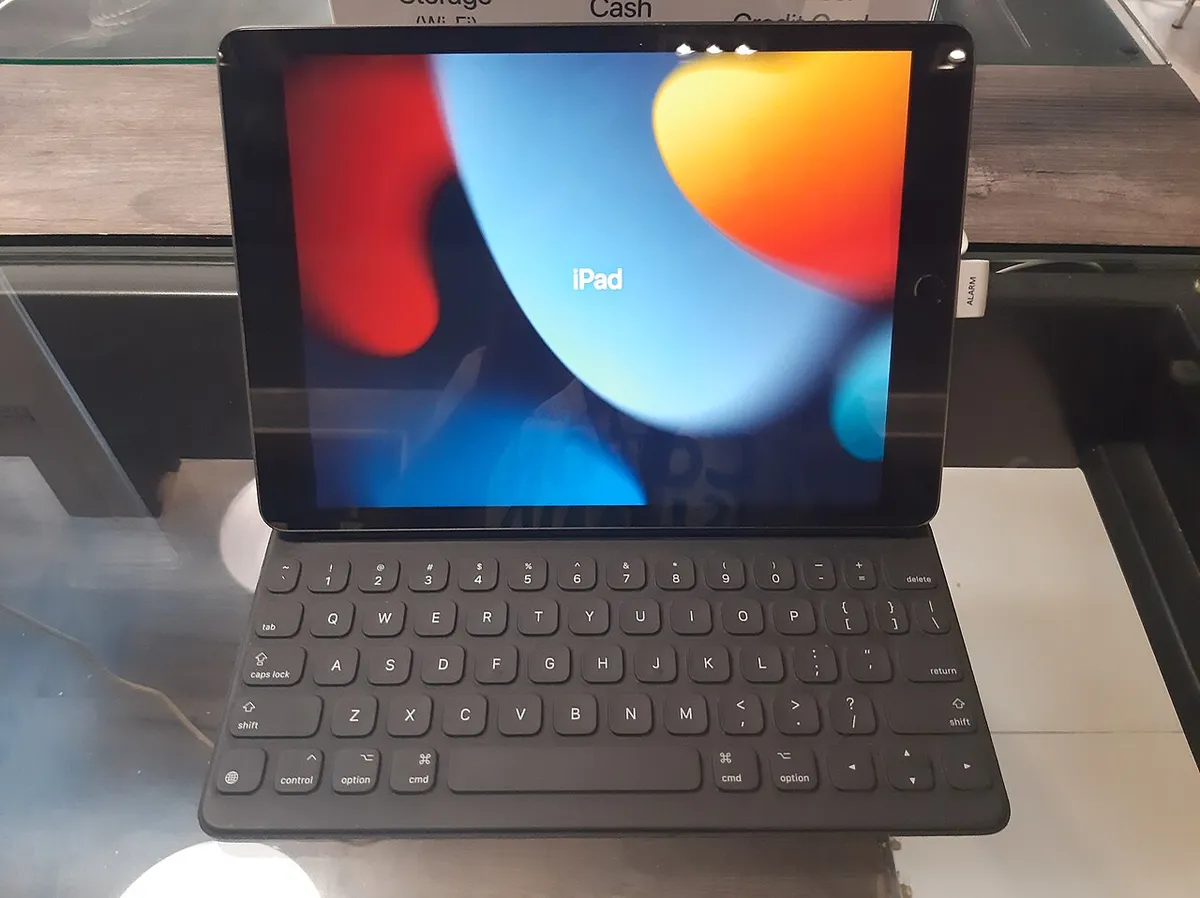
Fair price · India 2026
Prices checked 26 Jul 2026Range: ₹9,000 to ₹16,000 · depends on condition
Depreciation curve
5-year outlookThree ways to sell
Jaldi Bikega
Quick sell · 1–3 days
₹9,000
Sahi Daam · pick
Fair price · 5–10 days
₹14,000
Meri Marzi
Premium · 2–4 weeks
₹21,000
You paid new
₹30,900
Lost ₹16,900 (55%)
In gold
1.1g
@ ₹12,183/g (intl. rate)
Drops by
₹500
every month waiting
= Netflix for
93 mo
(at ₹149/month)
How Much Is a Used Apple iPad 9th Generation Worth in India?
A used Apple iPad 9th Generation is worth ₹9,000 to ₹21,000 in India in 2026, depending on storage variant, Wi-Fi vs Cellular connectivity, and physical/battery condition. Launched in India in late 2021, this was Apple’s entry-level iPad for years and sold in huge numbers to students and families, which keeps used demand consistently strong even five years later.
Is the Apple iPad 9th Generation Still Worth It in 2026?
The 9th Gen iPad runs on Apple’s A13 Bionic chip — the same processor found in the iPhone 11 — which was already a step behind Apple’s latest silicon at launch, and by 2026 it’s clearly dated. Even so, Apple’s long software support window means this iPad still runs a recent iPadOS version, which is genuinely rare for a five-year-old budget tablet from any other brand.
For students needing something for note-taking, video calls, reading, and light browsing, the 9th Gen iPad still handles daily tasks smoothly thanks to iPadOS’s efficient optimization. Where it shows its age is with heavier apps — video editing, demanding games, or multitasking with several apps open at once will feel noticeably slower than on a current-generation iPad.
The Lightning port (not USB-C) is another sign of its age, meaning you’ll need Apple’s proprietary cable rather than the USB-C accessories that now dominate the rest of the tech ecosystem — a real inconvenience if you own newer devices.
Bottom line: still a solid budget entry into the Apple ecosystem for basic use in 2026, especially for students, but anyone planning to use it for creative work or gaming should budget for a newer model instead.
Apple iPad 9th Generation Price Guide
| Condition | Price Range | What It Means |
|---|---|---|
| Like New | ₹16,000 – ₹21,000 | Minimal wear, 85%+ battery health, original box/accessories, no screen damage, fully functional. |
| Good | ₹12,000 – ₹16,000 | Minor cosmetic wear, functioning battery and Touch ID, no cracks, all features working. |
| Fair | ₹9,000 – ₹12,000 | Visible scratches/dents, some battery degradation, but screen intact and fully functional. |
Cellular variants and higher storage (256GB vs base 64GB) can add ₹2,000-4,000 over these ranges depending on condition and demand.
Advantages — Why Buyers Pick the Apple iPad 9th Generation in 2026
Genuine Apple Ecosystem Entry. For families already using iPhones or MacBooks, this iPad integrates seamlessly via iCloud, AirDrop, and Handoff — a real usability advantage over a cheaper Android tablet that many buyers still value.
Long Software Support. Apple’s update policy means the 9th Gen iPad still receives current iPadOS versions in 2026, offering security patches and feature updates well beyond what most Android tablets from the same era get.
Excellent Battery Life for Basic Use. Even with some degradation, the 9th Gen iPad’s large battery still comfortably delivers a full day of typical use — reading, video, and note-taking — for most buyers.
Solid Build Quality. The aluminum unibody design holds up well physically over years of use, and the Retina display remains sharp and colour-accurate for everyday content.
Apple Pencil (1st Gen) Support. For students who want basic handwritten note-taking or light sketching, this iPad supports the original Apple Pencil, a genuinely useful feature at this price point.
Trusted Resale and Repair Ecosystem. Because Apple devices are widely serviced across India, even in Tier-2 cities, keeping this iPad running long-term is easier than with many other tablet brands.
Disadvantages — Why You Might Skip the Apple iPad 9th Generation in 2026
Lightning Port, Not USB-C. Apple switched newer iPads to USB-C, so this model requires you to keep a separate Lightning cable — an increasing annoyance as USB-C becomes the universal standard across phones, laptops, and accessories.
Thick Bezels and Dated Design. The design hasn’t changed meaningfully since the original iPad launched in 2010 — thick bezels and a Home button feel visibly old next to the edge-to-edge screens on the iPad Air or iPad mini.
No Face ID, Only Touch ID. Some users find the Home button-based Touch ID slower and less convenient than Face ID, especially when the iPad is propped up on a stand.
Limited RAM for Multitasking. With only 3GB RAM, heavier multitasking (multiple Safari tabs, Split View with demanding apps) causes noticeable app reloading and slowdowns.
A13 Chip Struggles With Newer, Heavier Apps. As app developers optimize for newer chips, the A13 increasingly shows its age in apps with heavy graphics or AI-powered features — a used iPad Air M1 (~₹28,000-35,000) is a meaningfully faster alternative for creative or demanding work.
No Support for Apple Pencil 2nd Gen. Buyers wanting the more advanced, magnetically-attaching Apple Pencil 2 need to look at the iPad Air or iPad Pro instead, as this model only supports the older, less convenient 1st Gen Pencil that charges via the Lightning port.
Factors That Affect Apple iPad 9th Generation Resale Value
Storage capacity has a direct impact. The 256GB variant typically fetches ₹3,000-5,000 more than the base 64GB model, since 64GB fills up quickly with apps, photos, and downloaded content for students.
Wi-Fi + Cellular models command a premium. Cellular-capable units add ₹2,000-3,000 over Wi-Fi-only versions, valued by buyers who want internet access without relying on a hotspot.
Screen condition is critical. A crack-free, scratch-minimal display is essential — even minor screen damage can reduce resale by ₹2,000-4,000 since screen replacement costs are relatively high for this device’s overall value.
Battery health. Battery health above 85% adds ₹1,000-2,000 versus a unit closer to 75-80%, since replacement eats meaningfully into this tablet’s modest resale value.
Apple Pencil (1st Gen) bundled in the sale. Including a working original Apple Pencil can add ₹2,000-3,000, since it retails new for a similar amount and is a genuinely useful accessory for students.
Original box and charging accessories. Having the original box, cable, and adapter adds a modest ₹500-1,000 in buyer confidence and perceived authenticity.
iCloud lock status. A device with a properly removed Apple ID and no Activation Lock is essential — this isn’t optional, it determines whether the device is sellable at all.
Maintenance Cost Breakdown (India, 2026)
Table 1 — Authorized Apple Service Centre (genuine parts, full cost)
| Service | Cost | When Needed |
|---|---|---|
| Battery Replacement | ₹8,900 – ₹10,900 | Battery health below 80% or rapid drain. |
| Screen Replacement | ₹16,900 – ₹19,900 | Cracked or unresponsive display. |
| Charging Port Repair | ₹5,000 – ₹7,000 | Loose connection, intermittent, or no charging. |
| Home Button/Touch ID Repair | ₹6,000 – ₹8,000 | Non-functional Touch ID or unresponsive Home button. |
Table 2 — Third-Party Repair Shops (cheaper, with tradeoffs)
| Service | Cost | Tradeoff |
|---|---|---|
| Battery Replacement | ₹3,500 – ₹5,500 | Non-genuine battery, “Unknown Part” flag in some diagnostics, shorter lifespan. |
| Screen Replacement | ₹6,000 – ₹9,000 | Non-genuine glass/digitizer, occasional touch sensitivity or colour calibration issues. |
| Charging Port Repair | ₹1,800 – ₹3,000 | Non-genuine part, potential for future reliability issues. |
Given this iPad’s already modest resale value, most owners find repairs beyond ₹5,000-6,000 aren’t economically worth it unless it’s for personal continued use rather than resale.
Known Issues — Reported by Real Apple iPad 9th Generation Owners
Home Button Wear Over Time. Several owners on Apple Support Communities report the physical Home button becoming less responsive or requiring firmer presses after 2-3 years of heavy daily use, a mechanical wear issue common to Home-button iPads.
Battery Drain in Standby Mode. A recurring complaint on Reddit’s r/ipad and Apple Support Communities — some units show unexpectedly high battery drain even when idle in standby, often linked to background app refresh settings not being managed.
Charging Cable Fraying at the Lightning Connector. Widely discussed across Apple forums as a general Lightning-cable issue rather than being specific to this model, but relevant since this iPad still relies on Lightning — cables fraying near the connector after regular use is a common owner complaint.
Screen Scratches From Apple Pencil Use Without a Screen Protector. Reported by users on Reddit and MacRumors forums who used the 1st Gen Apple Pencil directly on the glass — the glossy display is more prone to micro-scratches from stylus use than the textured displays on Pro models.
Slower Performance With iPadOS Updates Over Time. Some long-term owners on Apple Support Communities note the A13 chip feels noticeably more sluggish after 2-3 years of iPadOS updates, particularly when multitasking with several apps.
Speaker Rattle at High Volume. A less common but recurring report on owner forums — the bottom-firing speakers can develop a faint rattling sound at maximum volume after extended use, generally not covered under warranty once expired.
Warranty Status Timeline
| Period | Warranty Status |
|---|---|
| Late 2021 – Late 2022 | Apple 1-year standard warranty (expired for all units) |
| Late 2021 – Late 2023 | AppleCare+ if purchased at time of sale (expired for virtually all units by 2026) |
| 2026 | No manufacturer warranty. All repairs are out-of-pocket. |
| 2026 | Third-party device insurance: rarely economical given this iPad’s modest resale value. |
Pre-Purchase Inspection Checklist
Essential Checks
- Check the serial number via Settings > General > About and verify it against Apple’s official coverage checker at checkcoverage.apple.com.
- Confirm Activation Lock is off by asking the seller to sign out of iCloud and perform a factory reset in front of you.
- Test Touch ID by setting up your own fingerprint on the spot.
- Check battery health indirectly — a full charge cycle test or checking Settings > Battery for any warnings is a reasonable proxy since iPadOS doesn’t show exact battery health like iPhones do.
- Test both cameras (front and rear) by taking photos and a short video.
- Inspect the screen for dead pixels or burn marks using a plain white background at full brightness.
- Test the speakers by playing audio at various volumes and checking for distortion.
- Verify Wi-Fi, Bluetooth, and (if applicable) cellular connectivity all work correctly.
- Test the charging port with a Lightning cable, checking for a secure and consistent connection.
- Check for screen flex or creaking near the edges, which can indicate prior drop damage or a loose display assembly.
Insider Checks
THE ACTIVATION LOCK VERIFICATION: Have the seller perform a full factory reset (Settings > General > Reset > Erase All Content and Settings) in front of you, then complete the initial setup yourself. If it asks for the previous owner’s Apple ID, the device is locked and effectively unusable — a non-negotiable dealbreaker.
THE SCREEN FLEX TEST: Gently press near the edges of the screen while it’s off. Excessive flex or a creaking sound can indicate the display assembly wasn’t properly reseated after a repair, or the adhesive has degraded — worth negotiating down or walking away if pronounced.
THE CHARGING PORT LINT CHECK: Shine a flashlight into the Lightning port. Heavy lint buildup is common and harmless if cleaned, but corrosion or discoloration inside suggests prior liquid exposure — a potential future reliability issue not covered by any warranty.
THE APPLE PENCIL PAIRING TEST: If an Apple Pencil (1st Gen) is included, plug it into the Lightning port to charge and pair. If it fails to pair or charge, the Pencil itself may be faulty — this affects the bundle’s value by ₹2,000-3,000 if it doesn’t work.
Common Scams to Watch For (India 2026)
iCloud Activation Lock: The most serious risk with any used iPad — always insist on a factory reset with full sign-out before paying. A locked iPad is essentially a paperweight.
Refurbished Sold as Original/Unused: Some sellers present a repaired or refurbished unit as pristine. Check Settings > General > About for the serial number and cross-verify with Apple’s coverage checker, which can sometimes flag inconsistencies.
Screen or Battery Swapped With Non-Genuine Parts: Unlike iPhones, iPads don’t show explicit “Unknown Part” warnings as prominently, so physically inspect screen colour accuracy and check if the battery seems to drain unusually fast relative to claimed condition.
Fake or Counterfeit Apple Pencil Bundled In. Counterfeit Apple Pencils are common in the Indian grey market. A genuine 1st Gen Pencil has a specific weight and finish — test that it actually pairs and charges via the iPad’s Lightning port before accepting it as genuine.
Region-Locked or International Variant Confusion: While iPads are generally not region-locked for cellular in the way iPhones can be, verify the model number in Settings > General > About matches an Indian-market model if cellular connectivity matters to you, as some grey-market imports may lack correct carrier band support.
Water-Damaged Unit Disguised as Clean. Since iPads lack the visible Liquid Contact Indicator that iPhones have inside the SIM tray, water damage is harder to verify — test all functions (speakers, cameras, charging) thoroughly rather than relying on visual inspection alone.
Seller’s Guide — How to Maximize Your Apple iPad 9th Generation Resale
Data Preparation:
- Back up your data via iCloud or a computer before wiping the device.
- Sign out of iCloud completely (Settings > [Your Name] > Sign Out) and disable Find My iPad.
- Perform a full factory reset (Settings > General > Reset > Erase All Content and Settings) to remove Activation Lock.
Physical Preparation:
- Clean the screen and body thoroughly with a microfibre cloth.
- If you have a low battery health concern, a third-party battery swap (₹3,500-5,500) can meaningfully boost buyer confidence and final price.
Documentation Adds Value:
- Include the original box, charging cable, and adapter if available — this adds ₹500-1,000 to perceived value.
- If you have a working Apple Pencil (1st Gen), bundle it in — it can add ₹2,000-3,000 to your total sale price.
Listing Photography:
- Take clear photos of the front, back, and screen powered on to demonstrate functionality.
- Include a screenshot of Settings > General > About to show storage and model details clearly.
- Be transparent about any scratches or dents — buyers at this price point expect some wear and appreciate honesty.
Platform Choice:
- A bidding platform like Bids44 lets multiple buyers compete for a better price.
- Cashify offers a quick, guaranteed sale but typically at a lower payout than a private listing.
Final Verdict — Should You Buy or Sell in 2026?
For buyers: The Apple iPad 9th Generation in 2026 remains a genuinely sensible choice for students and light users wanting affordable entry into Apple’s ecosystem with long software support. Aim for a Good-condition, 64GB Wi-Fi unit in the ₹12,000-15,000 range, and always verify Activation Lock is cleared before paying. If your budget stretches to ₹28,000-35,000, a used iPad Air M1 offers a meaningfully faster, more modern alternative for creative work or heavier multitasking.
For sellers: Your iPad still holds decent value for its age — expect ₹12,000-16,000 for a Good-condition 64GB Wi-Fi model, more if you include a working Apple Pencil or have a Cellular variant. Selling privately or through a bidding platform like Bids44 typically nets more than a dealer exchange, which may offer ₹2,000-3,000 less. Clean data thoroughly and disable Activation Lock before listing — it’s the single biggest factor buyers check first.
Personalized estimate
Check your Apple value
Ten seconds. No signup.

Analyzing your item...
On Bids44, buyers compete for your item — so you always get the best price
Powered by Bids44 AI Fun fact
Your item is worth — grams of gold at today's rate
Gold rate: ~₹9,500/gram (Mar 2026). Every month you wait, your item loses value while gold goes up.
Happy with the price?
List on Bids44. Buyers compete. You pick the winner.
Ready to sell your Apple iPad?
Bids44 is India's bidding marketplace. Buyers compete. You get the best price — not the first offer.
List on Bids44Frequently Asked Questions
How much is a used Apple iPad 9th Generation worth in India in 2026?
Does battery health affect the Apple iPad 9th Generation resale value?
Is it better to sell my Apple iPad 9th Generation on Cashify, OLX, or a bidding platform?
What accessories should I include when selling a used Apple iPad 9th Generation?
Should I factory reset my Apple iPad 9th Generation before selling?
When will the Apple iPad 9th Generation lose value fastest?
More like this
Related Phones guides
Samsung Galaxy S24
6-yr depreciation
iQOO 13 Resale Value & Second Hand Price in India
6-yr depreciation
iPhone XS Max
6-yr depreciation
iPhone 11 Pro Max
6-yr depreciation
iPhone 13 Pro Max
6-yr depreciation
Apple iPad Air M2
6-yr depreciation
Also read